Thursday, November 3, 2016

Hello World Programme in Mule Soft ESB

We have already covered basics of Mule ESB in our previous blogs. Now this is the time to create a very basic "Hello World" program and get to know it practically.

To start with Mule soft ESB, you need to have below thing in your system.
  • JDK 1.7
  • Anypoint Studio (if not then download from here)


Step 1: Open Anypoint Studio in your system


Step 2: Go to “File” menu then go to “New” and then click “Mule Project


Step 3: Below screen will be opened and give “Hello World” name to your project.


Step 4: Click “Next” button. It will open below screen, which will show you the location of the project & JRE used.


Step 5: Click on the “Finish” button. Below screen will be opened in which you can see Palette, canvas, project files etc. Screen is very similar to eclipse IDE but you can see graphical canvas screen also over here.


Step 6: Below highlighted part in the screen called “Palette” which provides the inbuilt functional graphical components which can be dragged to canvas to create your programming logic. However you can write it XML code but by using Palette you can design your code very easily. All you need to drag to canvas the functionality you want.


Step 7: I am using HTTP component to start with Hello World program. You can find it in Palette or just write in the search box it will appear and drag it to your canvas screen.


Step 8: Once you drag it to your screen it will look like below image, in a same way drag one more component called “setPayload”.


Step 9: Select on the “HTTP” and click on “Message Flow”, you can see the below screen. Click on the highlighted Red Square to make your connector configuration.


Step 10: Below screen will pop up which has Port, Host Name and generic Name in it (Which is already filled).


Step 11: Click on the “OK” button.


Step 12: Now select “SetPayload” and click on the “Message Flow”. Define the value “Hello World” as highlighted.


Step 13: You can see the code by clicking the “Configuration XML” tab.
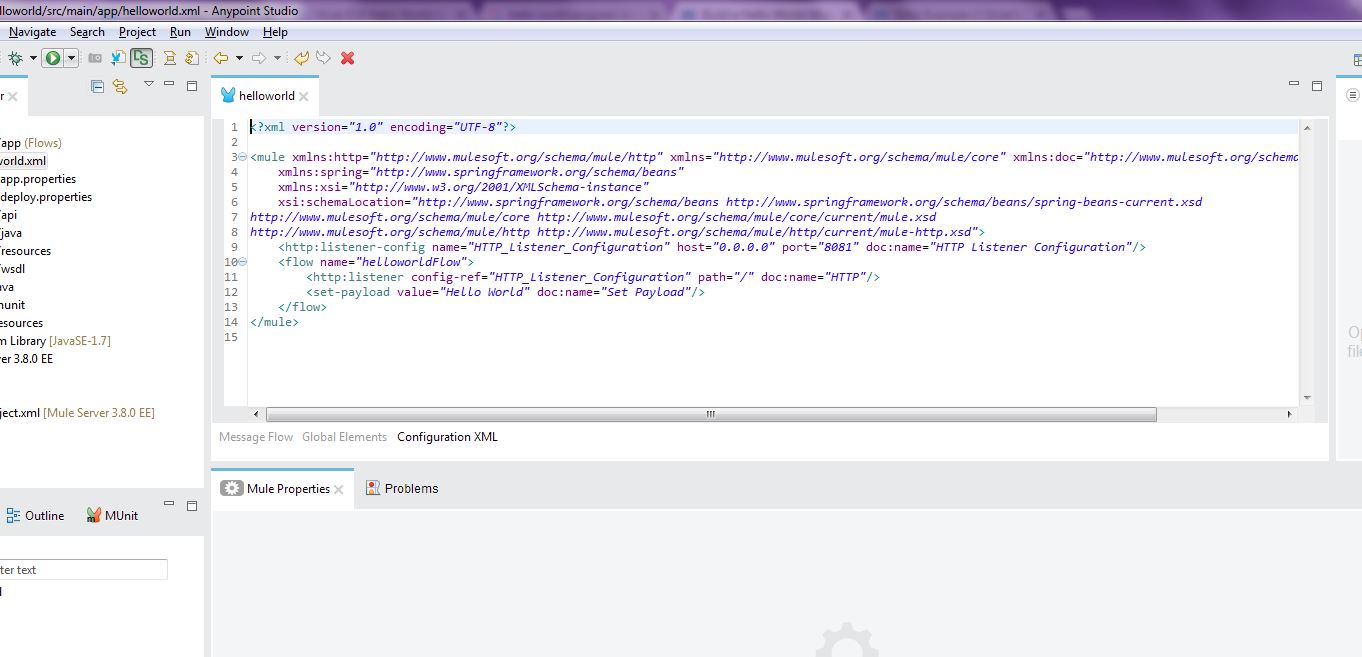

Step 14:  You are all set to go! Right click on the canvas and run project as “Hello World”. If everything goes fine in the console log then you can see the output in browser.


Step 15: Open your favorite browser and hit “http://localhost:8081” URL as shown below, you will be able to see the output of your first Mule ESB program!


Introduction to Mule Soft ESB

Mule ESB is Java bases Enterprise Service Bus. This is very light weight and provides facility to developer to integrate their different application without having any kind of dependency. It provides a very easy integration and enables different application to exchange their data.


Mule ESB provides the some powerful capabilities as mentioned below:

Orchestration:         
You can create and host a web service which can be used any time. You can do call different web service and design your own orchestration as per your requirement

Service Mediation:
Shield services from message formats and protocols. You can create different logic from the messaging and enable local independent service.

Message routing:
You can use router, filter, aggregate sequence to create your logic and route the message accordingly

Data transformation:
You can exchange the data in different formats and transport protocols.

Conversion:
You can receive any kind of message as input and transform to different message format as per your requirement

It can be easily integrate from POJO to any other component. It provides the reusable facility to developer without making any change in existing component because all logic or unit can be developed separately.

Mule Flow

Mule flow is a sequence of message processing events


Message Processor

These are the prepacked functionality that processes the message. Some of them are defined below.

  • Endpoints
  • Scope
  • Component
  • Transformers
  • Filters
  • Flow Control
  • Error Handling


Mule Security

Mule provides a very strong security with their own component

  • Mule Security Manager
  • Mule Security API
  • Pluggable Security Manager
  • Spring Security

Sunday, September 4, 2016

How to set a static response or property in class mediator in WSO2 ESB

WSO2 ESB provides us luxury to create a custom functionality in java as class mediator. In class mediator we can write our desired functionality in java class and that can be called from the ESB synapse file. We can pass some property from ESB file to class mediator and in a same way we can set some property in java class and that can be read from synapse file.

Here is an example in which I need to reply a static response to customer. However this can be done from many ways but I am choosing class mediator just to show how this can be done from class mediator.


 I want below static response to be shown in as actual response of the service. I have put this “StaticEmployeeDetails.xml” file in “XX\wso2esb-4.0.3\repository\conf\stub\StubXml\ StaticEmployeeDetails.xml” location.

Static XML Code:

<EmployeeDetails xmlns="http://shriwithjava.blogspot.co.nz/">
   <EmployeeData>
      <EmployeeId>201</EmployeeId>
      <EmployeeName>Shri</EmployeeName>
      <EmployeeAddress>Auckland</EmployeeAddress>
      <Department>IT</Department>
   </EmployeeData>
   <EmployeeData>
      <EmployeeId>202</EmployeeId>
      <EmployeeName>Bhajan</EmployeeName>
      <EmployeeAddress>Wellington</EmployeeAddress>
      <Department>IT</Department>
   </EmployeeData>
</EmployeeDetails>


Here is the Class mediator code which will be called from the wso2 Synapse file.

Class Mediator Code:

package org.wso2.custom;

import java.io.BufferedReader;
import java.io.FileReader;
import java.io.IOException;

import org.apache.synapse.MessageContext;
import org.apache.synapse.mediators.AbstractMediator;

public class CustomMediator extends AbstractMediator {

                private static String Response = "StaticResponse";
                private static String ResponseXml = "";
                private static String FileName = "";
                private static String FilePath = "F:\\Shri Kant\\WSO2\\wso2esb-4.0.3\\repository\\conf\\stub\\StubXml\\";
                public boolean mediate(MessageContext context) {
                                // TODO Implement your mediation logic here
                                //FileName=context.getProperty("").toString();
                                FileName=(String)context.getProperty("FileName");
                                BufferedReader br = null;
                                try {

                                                String sCurrentLine;

                                                br = new BufferedReader(new FileReader(FilePath+FileName+".xml"));

                                                while ((sCurrentLine = br.readLine()) != null) {
                                                                ResponseXml+=               sCurrentLine;
                                                }
                                                context.setProperty(Response, ResponseXml);
                                               
                                                System.out.println(context.getSoapAction()+" : This is the SOAP Action");
                                                System.out.println(context.getConfiguration()+" : This is the getConfiguration");
                                                System.out.println(context.getMessageID()+" : This is the getMessageID");
                                                System.out.println(context.getTracingState()+" : This is the getTracingState");
                                                System.out.println(context.getWSAAction()+" : This is the getWSAAction");
                                                System.out.println(context.getWSAMessageID()+" : This is the getWSAMessageID");
                                                System.out.println(context.getClass()+" : This is the getClass");
                                                System.out.println(context.getContextEntries()+" : This is the getContextEntries");
                                                System.out.println(context.getEnvelope()+" : This is the getEnvelope");
                                                System.out.println(context.getEnvironment()+" : This is the getEnvironment");
                                                System.out.println(context.getFaultSequence()+" : This is the getFaultSequence");
                                                System.out.println(context.getFaultStack()+" : This is the getFaultStack");
                                                System.out.println(context.getPropertyKeySet()+" : This is the getPropertyKeySet");
                                                System.out.println(context.getServiceLog()+" : This is the getServiceLog");
                                                System.out.println(context.isDoingGET()+" : This is the isDoingGET");
                                                System.out.println(context.isDoingMTOM()+" : This is the isDoingMTOM");
                                                System.out.println(context.isDoingPOX()+" : This is the isDoingPOX");
                                                System.out.println(context.isDoingSWA()+" : This is the isDoingSWA");
                                                System.out.println(context.isFaultResponse()+" : This is the isFaultResponse");
                                                System.out.println(context.isSOAP11()+" : This is the isSOAP11");
                                                System.out.println(context.isResponse()+" : This is the isResponse");
                                               
                                } catch (IOException e) {
                                                e.printStackTrace();
                                } finally {
                                                Response="";
                                                try {
                                                                if (br != null){
                                                                                br.close();
                                                                               
                                                                }
                                                } catch (IOException ex) {
                                                                ex.printStackTrace();
                                                }
                                }
                               
                               
                                return true;
                }
}


  • ·         Different property has been used in above code just to show that what all we can set from class mediator and use it in our synapse file.
  • ·         Create ja jar file of this above code and place it in the “X\ wso2esb-4.0.3\repository\components\lib\CustomMediator.jar”
  • ·         Now we need to provide the reference of this class from the synapse.xml file

I am creating a service “MyCustomProxy”. You can see that I have used “<class name="org.wso2.custom.CustomMediator"/>” code to call the class mediator. I have also used the javascript function which will change the response from string to xml. “<property name="StaticResponse" action="set" expression="get-property('StaticResponse')"/>” is used to get response from the class mediator which will be read from the static xml file.

Synpse.xml:

<localEntry key="StaticServiceScript" src="file:repository/conf/stub/StaticTransformResponse.js"/>
               
<proxy name="MyCustomProxy" transports="http" startOnLoad="true" statistics="enable" trace="disable">
                <target inSequence="MyCustom_IN" outSequence="MyCustom_OUT" faultSequence="CommonFaultHandler"/>
                <publishWSDL key="MyCustom_wsdl"/>
</proxy>
<localEntry key="MyCustom_wsdl" src="file:repository/conf/employee/OverseaseEmployee.wsdl"/>
<sequence name="MyCustom_IN">
                <property name="FileName" value="StaticEmployeeDetails" action="set"/>     
                <class name="org.wso2.custom.CustomMediator"/>
                <property name="StaticResponse" action="set" expression="get-property('StaticResponse')"/>
                <script language="js" key="StaticServiceScript" function="sendStaticResponse"/>
                <property name="RESPONSE" value="true"/>
                <header name="To" action="remove"/>
                <send/>
                <drop/>
</sequence>    


Java Script Code:
I am using a java script code which will be called from synapse.xml file. This will create a string text to xml content.

StaticTransformResponse.js


<x><![CDATA[  

                function sendStaticResponse(mc) {
                var StaticResponse = new XML(mc.getProperty("StaticResponse"));
                                                mc.setPayloadXML(StaticResponse);
               
                  }
]]></x>


Just restart the server to reflect the changes and hit the “MyCustomProxy” service and you will get the desired response. If you want to change the static response just change the content of the “StaticEmployeeDetails.xml” file located inside of “wso2esb-4.0.3\repository\conf\stub\StubXml” and restart the server.


Above image shows all the parameter what we have set in out java class. Same things we can get it in synapse.xml file as per our requirement.

Monday, August 1, 2016

How to use Clone Mediator in WSO2 ESB

Clone mediator is used to send same massage to multiple endpoints. It basically clone same message to multiple message based on our requirement and send it to multiple endpoints. We can aggregate the response which we get from the multiple endpoints and show as one response.

Requirement:

Suppose there is a requirement where we have to get the entire IT employee details who all works overseas. We have different databases and different places and each database has employee records. We have only one input parameter which is department, all I need is IT employee details.

Solution:

I have created 3 data services, first provides Indian employee detail, second provide USA employee details and 3rd provides New Zealand employee details. I have created same format DSS with same namespace with one input parameter and 4 output parameter in one employee list and response can have multiple employee list.


DSS:
<data name="EmployeeDetailsNZ" enableBatchRequests="false" enableBoxcarring="false" serviceStatus="active">
   <description>This provides Employee details</description>
   <config id="EMPDS">
      <property name="org.wso2.ws.dataservice.driver">oracle.jdbc.driver.OracleDriver</property>
      <property name="org.wso2.ws.dataservice.protocol">jdbc:oracle:thin:SYSTEM/SYSTEM@localhost:1521/xe</property>
      <property name="org.wso2.ws.dataservice.user">SYSTEM</property>
      <property name="org.wso2.ws.dataservice.password">SYSTEM</property>
      <property name="org.wso2.ws.dataservice.minpoolsize"></property>
      <property name="org.wso2.ws.dataservice.maxpoolsize"></property>
      <property name="org.wso2.ws.dataservice.validation_query"></property>
   </config>
   <query id="EmpDetailsQuery" useConfig="EMPDS">
      <sql>select * from EMP_DETAILS_NZ where DEPARTMENT_V=?</sql>
      <result element="EmployeeDetails" rowName="EmployeeData" defaultNamespace="http://shriwithjava.blogspot.co.nz/">
         <element name="EmployeeId" column="EMP_ID_N" xsdType="xs:string" />
   <element name="EmployeeName" column="EMP_NAME_V" xsdType="xs:string" />
   <element name="EmployeeAddress" column="EMP_ADD_V" xsdType="xs:string" />
   <element name="Department" column="DEPARTMENT_V" xsdType="xs:string" />
   </result>
      <param name="Department" paramType="SCALAR" sqlType="STRING" type="IN" />
   
   </query>
   <operation name="getEmployeeDetails">
      <description></description>
      <call-query href="EmpDetailsQuery">
         <with-param name="Department" query-param="Department" />
   
      </call-query>
   </operation>
</data>

DSS request and response format:

Request:

<soapenv:Envelope xmlns:soapenv="http://schemas.xmlsoap.org/soap/envelope/" xmlns:shr="http://shriwithjava.blogspot.co.nz/">
   <soapenv:Header/>
   <soapenv:Body>
      <shr:getEmployeeDetails>
         <shr:Department>IT</shr:Department>
      </shr:getEmployeeDetails>
   </soapenv:Body>
</soapenv:Envelope>

Response:

<soapenv:Envelope xmlns:soapenv="http://schemas.xmlsoap.org/soap/envelope/">
   <soapenv:Body>
      <EmployeeDetails xmlns="http://shriwithjava.blogspot.co.nz/">
         <EmployeeData>
            <EmployeeId>201</EmployeeId>
            <EmployeeName>Shri</EmployeeName>
            <EmployeeAddress>Auckland</EmployeeAddress>
            <Department>IT</Department>
         </EmployeeData>
         <EmployeeData>
            <EmployeeId>202</EmployeeId>
            <EmployeeName>Bhajan</EmployeeName>
            <EmployeeAddress>Wellington</EmployeeAddress>
            <Department>IT</Department>
         </EmployeeData>
      </EmployeeDetails>
   </soapenv:Body>
</soapenv:Envelope>


ESB Changes:

I have created a service which will get all the details of the overseas employee for different department. I will call all the endpoints (Indian, USA and New Zealand employee details) and aggregate the response into one. I have to use same input and that will be cloned for each endpoint from the clone mediator.

Synapse Code:

<definitions>
<proxy name="OverseasEmpDetailsProxy" transports="http" startOnLoad="true" trace="disable" statistics="enable">
   <target inSequence="OverseasEmpDetails_IN" outSequence="OverseasEmpDetails_OUT" faultSequence="CommonFaultHandler"/>
   <publishWSDL key="OverseasEmpDetails_wsdl"/>
</proxy>
<localEntry key="OverseasEmpDetails_wsdl" src="file:repository/conf/employee/OverseaseEmployee.wsdl"/>
 
<sequence name="OverseasEmpDetails_IN">
 <clone>
  <target>
   <endpoint key="NZEmployeeDetails_EPR"/>
  </target>
  <target>
   <endpoint key="INDEmployeeDetails_EPR"/>
  </target>
  <target>
   <endpoint key="USAEmployeeDetails_EPR"/>
  </target>
 </clone>
</sequence>
 
<sequence name="OverseasEmpDetails_OUT">
   <aggregate>
  <completeCondition>
   <messageCount min="-1" max="-1"/>
  </completeCondition>
  <onComplete xmlns:shr="http://shriwithjava.blogspot.co.nz/" expression="//shr:EmployeeDetails/shr:EmployeeData">
   <send/>
  </onComplete>
 </aggregate>
</sequence>
 
 <endpoint name="NZEmployeeDetails_EPR">
 <address uri="http://localhost:9763/services/EmployeeDetailsNZ">
  <timeout>
   <duration>10000</duration>
   <responseAction>fault</responseAction>
  </timeout>
  <suspendOnFailure>
   <errorCodes>101500,101501,101506,101507,101508</errorCodes>
   <progressionFactor>0.0</progressionFactor>
  </suspendOnFailure>
  <markForSuspension>
   <errorCodes>101504,101505</errorCodes>
  </markForSuspension>
 </address>
</endpoint>
 <endpoint name="INDEmployeeDetails_EPR">
 <address uri="http://localhost:9763/services/EmployeeDetailsIndia">
  <timeout>
   <duration>10000</duration>
   <responseAction>fault</responseAction>
  </timeout>
  <suspendOnFailure>
   <errorCodes>101500,101501,101506,101507,101508</errorCodes>
   <progressionFactor>0.0</progressionFactor>
  </suspendOnFailure>
  <markForSuspension>
   <errorCodes>101504,101505</errorCodes>
  </markForSuspension>
 </address>
</endpoint>
 <endpoint name="USAEmployeeDetails_EPR">
 <address uri="http://localhost:9763/services/EmployeeDetailsUSA">
  <timeout>
   <duration>10000</duration>
   <responseAction>fault</responseAction>
  </timeout>
  <suspendOnFailure>
   <errorCodes>101500,101501,101506,101507,101508</errorCodes>
   <progressionFactor>0.0</progressionFactor>
  </suspendOnFailure>
  <markForSuspension>
   <errorCodes>101504,101505</errorCodes>
  </markForSuspension>
 </address>
</endpoint>
 
<sequence name="CommonFaultHandler">
 <log level="custom">
  <property name="MESSAGE" value="Executing default &quot;fault&quot; sequence"/>
  <property name="ERROR_CODE" expression="get-property('ERROR_CODE')"/>
  <property name="ERROR_MESSAGE" expression="get-property('ERROR_MESSAGE')"/>
 </log>
 <header name="To" action="remove"/>
 <drop/>
</sequence>
 
 
</definitions>


Restart the ESB and load the WSDL in SOAP UI results will look like:

Request:

<soapenv:Envelope xmlns:soapenv="http://schemas.xmlsoap.org/soap/envelope/" xmlns:shr="http://shriwithjava.blogspot.co.nz/">
   <soapenv:Header/>
   <soapenv:Body>
      <shr:getEmployeeDetails>
         <shr:Department>IT</shr:Department>
      </shr:getEmployeeDetails>
   </soapenv:Body>
</soapenv:Envelope>


Response:

<soapenv:Envelope xmlns:soapenv="http://schemas.xmlsoap.org/soap/envelope/">
   <soapenv:Body>
      <EmployeeDetails xmlns="http://shriwithjava.blogspot.co.nz/">
         <EmployeeData>
            <EmployeeId>201</EmployeeId>
            <EmployeeName>Shri</EmployeeName>
            <EmployeeAddress>Auckland</EmployeeAddress>
            <Department>IT</Department>
         </EmployeeData>
         <EmployeeData>
            <EmployeeId>202</EmployeeId>
            <EmployeeName>Bhajan</EmployeeName>
            <EmployeeAddress>Wellington</EmployeeAddress>
            <Department>IT</Department>
         </EmployeeData>
         <EmployeeData>
            <EmployeeId>004</EmployeeId>
            <EmployeeName>Viru</EmployeeName>
            <EmployeeAddress>Kanpur</EmployeeAddress>
            <Department>IT</Department>
         </EmployeeData>
         <EmployeeData>
            <EmployeeId>111</EmployeeId>
            <EmployeeName>Tahseen</EmployeeName>
            <EmployeeAddress>New York</EmployeeAddress>
            <Department>IT</Department>
         </EmployeeData>
         <EmployeeData>
            <EmployeeId>113</EmployeeId>
            <EmployeeName>JD</EmployeeName>
            <EmployeeAddress>Washington</EmployeeAddress>
            <Department>IT</Department>
         </EmployeeData>
      </EmployeeDetails>
   </soapenv:Body>
</soapenv:Envelope>

You can see the response from different service have been merged into one and we only sent a single request with a department parameter.