Thursday, September 3, 2015

How to send request in multiple endpoints in WSO2 ESB

If there is a scenario in which we have to send a request to multiple endpoints then this can be achieved by the Recipient List Endpoints. It can contain multiple child endpoints in which we have send request.  It routes cloned copies of messages to each child recipient.

Syntax:

<recipientlist>
    <endpoint .../>+
</recipientlist>

As illustrated below diagram an incoming message is transferred to any number of endpoint defined inside of <recipientlist> tag.  


Example:

In below example we are trying to send same message to three different endpoints which have been defined inside of send mediator.

<!-- Start of GetEmployeeDetailsProxy-->
<proxy name="GetEmployeeDetailsProxy" transports="https http" startOnLoad="true" trace="disable" statistics="enable">
<target inSequence="GetEmployeeDetailsProxy_IN" outSequence="GetEmployeeDetailsProxy_OUT" faultSequence="CommonFaultHandler"/>
<publishWSDL key="GetEmployeeDetailsProxy_wsdl"/>
</proxy>
<localEntry key="GetEmployeeDetailsProxy_wsdl" src="file:repository/conf/employee/resources/proxy/employeeDetails.wsdl"/>
<sequence name="GetEmployeeDetailsProxy_IN">
<log level="full"/>
<script language="js">java.lang.Thread.sleep(25000);</script>
<send>
<!--Dynamic Recipient List-->
<endpoint>
<recipientlist>
<endpoint>
<address uri="http://xxxx1:8280/services/GetEmployeeDetailsProxy"/>
</endpoint>
<endpoint>
<address uri="http://xxxx2:8280/services/GetEmployeeDetailsProxy"/>
</endpoint>
<endpoint>
<address uri="http://xxxx3:8280/services/GetEmployeeDetailsProxy"/>
</endpoint>
</recipientlist>
</endpoint>         
</send>
</sequence>
<sequence name="GetEmployeeDetailsProxy_OUT">
<log level="full"/>
<send/>
</sequence>
<!-- End of GetEmployeeDetailsProxy-->

There are 3 endpoint defined and request will send to each endpoint. Endpoint can be increased as required, just need to add endpoint entry in synapse.


Wednesday, September 2, 2015

How to set time delay between two mediators or delay in request in WSO2 ESB

There are some scenarios when we have requirement like to put delay between the request and response. ESB provides facility to add java script mediator in it. So below is the function of java script, can be used to put delay between two mediators.

Syntax:

<script language="js">java.lang.Thread.sleep(12000);</script>

Example:

Below is the pass-through proxy and in this example we want ESB to wait 12 second before sending the request to end point.

<!-- Start of GetEmployeeDetailsProxy-->

<proxy name="GetEmployeeDetailsProxy" transports="https http" startOnLoad="true" trace="disable" statistics="enable">
<target inSequence="GetEmployeeDetailsProxy_IN" outSequence="GetEmployeeDetailsProxy_OUT" faultSequence="CommonFaultHandler"/>
<publishWSDL key="GetEmployeeDetailsProxy_wsdl"/>
</proxy>

<localEntry key="GetEmployeeDetailsProxy_wsdl" src="file:repository/conf/employee/resources/proxy/employeeDetails.wsdl"/>

<sequence name="GetEmployeeDetailsProxy_IN">
<log level="full"/>
<script language="js">java.lang.Thread.sleep(25000);</script>
<send>
<endpoint key="GetEmployeeDetailsProxy_EPR"/>
</send>
</sequence>


<endpoint name="GetEmployeeDetailsProxy_EPR">  
<address uri="http://xxxx:8280/services/GetEmployeeDetailsProxy">      
<timeout>
<duration>30000</duration>
<responseAction>fault</responseAction>
</timeout>
<suspendOnFailure>
<errorCodes>101500,101501,101506,101507,101508</errorCodes>
<initialDuration>3000</initialDuration>
<progressionFactor>1.0</progressionFactor>
</suspendOnFailure>
<markForSuspension>
<errorCodes>101504,101505</errorCodes>
<retriesBeforeSuspension>3</retriesBeforeSuspension>
<retryDelay>1</retryDelay>
</markForSuspension>
</address>
</endpoint>

<sequence name="GetEmployeeDetailsProxy_OUT">
<log level="full"/>
<send/>
</sequence>

<!-- End of GetEmployeeDetailsProxy-->


In above example you can see that in IN sequence we have put java script sleep function before sending request and the sleep time is 12 second. To ESB will wait for 12 second before sending request to end point.

Monday, August 17, 2015

How to use XQuery in WSO2 ESB

To transfer the message in WSO2 ESB XQuery can also be used like Script, XSLT and payload mediator. XQuery provides the facility to query like database within the xml. We can filter xml response with xml query so based on the requirement we have to use transform mediator.

We can define XQuery in the synapse with below syntax.

<xquery key="string" [target="xpath"]>
    <variable name="string" type="string" [key="string"] [expression="xpath"] [value="string"]/>?
</xquery>

In above syntax we have to provide some parameter as mentioned below.

  • In key we have to provide a unique String name of it which can be used in service logic to call XQuery. It specifies the registry of the XQuery file.
  • Target is an attribute which specifies the node of the SOAP message that should be transformed. By default the first child of the SOAP body is selected.
  • In variable we can pass an attribute or variable value like in java function which can be retrieved in XQuery file to process further.


Console UI:

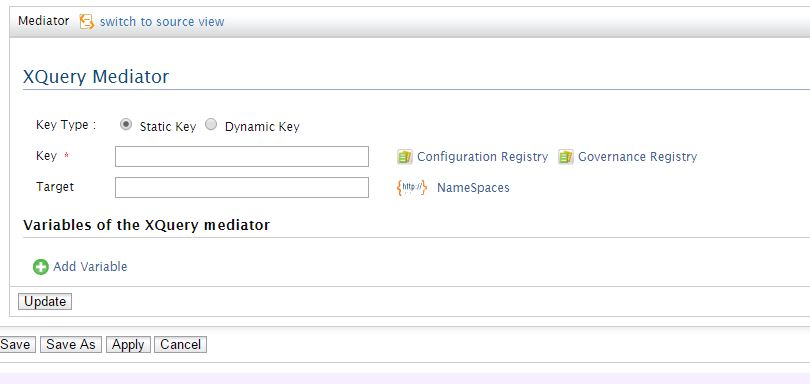
XQuery comes in the category of transformation, so if you select transform menu, you can see XQuery option in it.


You can fill the required details like Key Type, Key and its Target. Once you click Apply and save, it will be added in your service.


Example:

In this example we are trying to find the details of an employee which belongs to IT department through XQuery mediator.

Define XQuery:

I am giving the XQuery key name is “GetEmployeeDetail_XQ” and also giving its path resides in conf directory.

<localEntry key="GetEmployeeDetail_XQ" src="file:repository/conf/employee/resources/xquery/GetEmployeeDetail.xq"/>

Call XQuery in Synapse:

<xquery key="GetEmployeeDetail_XQ">
<variable name="Department" action="set" value="IT"/>
</xquery>

In this XQuery we are also passing one variable and value of this variable is “IT”.

XQuery:

xquery version "1.0";
declare namespace swj="http://shriwithjava.blogspot.co.nz/";
declare variable $Department as xs:string external;

declare variable $EmployeeName := $EmployeeDetailsResponse/swj:EmployeeDetails[swj:DepartmentNumber=$Department]/swj:EmployeeName/text();
declare variable $EmployeeDesignation := $EmployeeDetailsResponse/swj:EmployeeDetails[swj:DepartmentNumber=$Department]/swj:EmployeeDesignation/text();
declare variable $EmployeeAddress := $EmployeeDetailsResponse/swj:EmployeeDetails[swj:DepartmentNumber=$Department]/swj:EmployeeAddress/text();
declare variable $EmployeePhone := $EmployeeDetailsResponse/swj:EmployeeDetails[swj:DepartmentNumber=$Department]/swj:EmployeePhone/text();

<EMPLOYEE_DETAILS_RESPONSE>
  <EMP_NAME>{$EmployeeName}</EMP_NAME>
  <EMP_DESG>{$EmployeeDesignation}</EMP_DESG>
  <EMP_ADD>{$EmployeeAddress}</EMP_ADD>
  <EMP_PHONE>{$EmployeePhone}</EMP_PHONE>
</EMPLOYEE_DETAILS_RESPONSE>


Retrieve details in Synapse:

From the below Xpath expression we can get the value of Employee belongs to IT department from the XQuery, we have transformed.

<property name="EmployeeName" action="set" expression="//EMPLOYEE_DETAILS_RESPONSE/EMP_NAME/text()"/>
<property name="EmployeeDesignation" action="set" expression="//EMPLOYEE_DETAILS_RESPONSE/EMP_DESG/text()"/>       
<property name="EmployeeAddress" action="set" expression="//EMPLOYEE_DETAILS_RESPONSE/EMP_ADD/text()"/>
<property name="EmployeePhone" action="set" expression="//EMPLOYEE_DETAILS_RESPONSE/EMP_PHONE/text()"/>

Thursday, August 13, 2015

How to use XSLT Mediator in WSO2 ESB

XSLT mediator is used to transform the message as we do in script and payload factory mediator. We can create a structure of xml as required to send or receive in request or response.


To add an xslt mediator go to the IN sequence of the service then add child --àtransform ---à XSLT


You will see the below screen.


Add the details as required then click Apply and finish to add xslt mediator.
To use it direct in synapse file follow the syntax.

<syn:localEntry key="<KEY_NAME>" src="<FILE_PATH>"/>

  • In Key, you have to give a name by which XSLT can be referred in synapse.
  • In source, you have to provide the XSLT file name with its complete path.


Now to call the XSLT in the service, define below syntax, you can also pass some variable in it which will be picked up in XSLT as required.

<syn:xslt key="<KEY_NAME>">
<syn:property name="<PROPERTY_NAME>" expression="<EXPRESSION_VALUE>" type="<DATA_TYPE>"/>
</syn:xslt>       

Write above code to use XSLT, there are some values you have to provide as below.

  • In key, you have to pass the name of the value which has been defined in in “localEntry”
  • In property, you can pass variable which will be picked up in XSLT.
  • In expression, you can pass dynamic variable value which we have got from other source.
  • In type, we have to pass data type like String or Integer etc.


XSLT Structure:

<xsl:stylesheet version="2.0"
     xmlns:xsl="http://www.w3.org/1999/XSL/Transform"
     xmlns:xs="http://www.w3.org/2001/XMLSchema"
     xmlns:fn="http://www.w3.org/2005/xpath-functions"
     exclude-result-prefixes="xs fn xsl">
<!--<xsl:param name="<PASSED PARAMETER FROM SYNAPSE>"/> ->
<xsl:template match="/">
<!-—STRUCTURE OF XML ->
</xsl:template>
</xsl:stylesheet>

Example:

In example we are trying to get employee details through XSLT in desired structure.

Here we are defining the XSLT to be used.

<localEntry key="EmplyeeDetails_XSLT" src="file:repository/conf/EMP/resources/xslt/EmplyeeDetails.xslt"/>

To call this XSLT we are defining below code and also passing two parameters.

<xslt key="EmplyeeDetails_XSLT">
<property name="EmpAddress" expression="get-property('EmpAddress')" type="STRING"/>
<property name="EmpName" expression="get-property('EmpName')" type="STRING"/>
</xslt>         

This is the XSLT we have created to transform the message.

XSLT:

<xsl:stylesheet version="2.0"
     xmlns:xsl="http://www.w3.org/1999/XSL/Transform"
     xmlns:xs="http://www.w3.org/2001/XMLSchema"
     xmlns:fn="http://www.w3.org/2005/xpath-functions"
       xmlns:emp="http://shriwithjava.blogspot.co.nz/empdetails/"
     exclude-result-prefixes="xs fn xsl">

<xsl:param name="EmpAddress"/>
<xsl:param name="EmpName"/>
<xsl:template match="/">
<emp:GetEmployeeDetails xmlns:emp="http://shriwithjava.blogspot.co.nz/empdetails/">
<emp:empName><xsl:value-of select="$EmpName"></emp:empName>
 <emp:empAddress><xsl:value-of select="$EmpAddress"></emp:empAddress>
    </emp:GetEmployeeDetails>
</xsl:template>
</xsl:stylesheet>

In synapse if we want to get data from this XSLT we can extract value by below property.

<syn:property name="EmpName" expression="//emp:empName"  xmlns:emp="http://shriwithjava.blogspot.co.nz/empdetails/" type="STRING"/>

By the property mediator we can get the transformed value from the XSLT mediator.

Tuesday, August 11, 2015

Exception/Error Handling in WSO2 ESB Endpoint

When we create a service in ESB this needs to be send to a particular end point, in transport layer it might be possible that any error can come so it is necessary to handle this situation wherever an error occurred.

If the end point is not available or due to any firewall issue by which connection time out may occur then your message will be lost. Therefore to overcome from this situation error handling is required.

In endpoint configure for error handling can have below three states.

  • Active: End point is up and ready to handle request.
  • Timeout: An error has come but still message is received. It will keep on receiving message until maximum retries. If it keeps on failing then it will go to suspended state.
  • Suspended: In this state message can’t be received or sent and endpoint result will go in fault. ESB waits until the initial duration to be passed by default it is 30 second. In between if any request gets succeeded then it will go to Active state else in timeout error. ESB waits before retrying messages using the following formula:
Min(current suspension duration * progressionFactor, maximumDuration)


Example:

<endpoint name="EmployyeDetails_EPR">
<address uri="http://XXXX:9773/services/getEmployeeDetails">
<timeout>
<duration>30000</duration>
</timeout>
<markForSuspension>
<errorCodes>101504, 101505</errorCodes>
<retriesBeforeSuspension>3</retriesBeforeSuspension>
<retryDelay>1</retryDelay>
</markForSuspension>
<suspendOnFailure>
<errorCodes>101500, 101501, 101506, 101507, 101508</errorCodes>
<initialDuration>3000</initialDuration>
<progressionFactor>1.0</progressionFactor>
</suspendOnFailure>
</address>
</endpoint>


Timeout Setting

Name
Values
Default
Description
duration
Miliseconds
60000
If within 60 second response does not come then it will go to timeout state
responseAction
discard, fault, none
none
On failure It checks whether message needs to be discarded or need to go in exception handling state
MarkForSuspension State


Name
Values
Default
Description
errorCodes
Comma separated list of error codes
101504, 101505
101504: shows the connection timeout error 101505: connection closed
retriesBeforeSuspension
Integer
0
It shows how many time it can retry to send message
retryDelay
milliseconds
0
wait time between the last retry  and the next retry.

SuspensionOnFailure State

Name
Values
Default
Description
errorCodes
Comma separated error codes
All the errors except the errors specified inmarkForSuspension
Errors that send the endpoint into the "Suspended" state.
initialDuration
milliseconds
30000
This is the default time after this time retry will occur
progressionFactor
Integer
1
The endpoint will try to send the messages after the initialDuration. If it still fails, the next duration is calculated as:
Min(current suspension duration * progressionFactor, maximumDuration)
maximumDuration
milliseconds
Long.MAX_VALUE
Upper bound of retry duration.